 417
417

 阿里云
阿里云
Pig 开发手册__Hadoop_开发人员指南_E-MapReduce-阿里云
在 Pig 中使用 OSS
在使用 OSS 路径的时候,请使用类似如下的形式
oss://${AccessKeyId}:${AccessKeySecret}@${bucket}.${endpoint}/${path}
参数说明:
${accessKeyId}:您账号的 AccessKeyId。
${accessKeySecret}:该 AccessKeyId 对应的密钥。
${bucket}: 该 AccessKeyId 对应的 bucket。
${endpoint}:访问 OSS 使用的网络,由您集群所在的 region 决定,对应的 OSS 也需要是在集群对应的 region。
${path}:bucket 中的路径。
具体的值请参考 OSS Endpoint
以 Pig 中带的 script1-hadoop.pig 为例进行说明,将 Pig 中的 tutorial.jar 和 excite.log.bz2 上传到 OSS 中,假设上传路径分别为oss://emr/jars/tutorial.jar和oss://emr/data/excite.log.bz2。
请参见如下操作步骤:
- 编写脚本。将脚本中的 jar 文件路径和输入输出路径做了修改,如下所示。注意 OSS 路径设置形式为
oss://${accesskeyId}:${accessKeySecret}@${bucket}.${endpoint}/object/path。
/** Licensed to the Apache Software Foundation (ASF) under one* or more contributor license agreements. See the NOTICE file* distributed with this work for additional information* regarding copyright ownership. The ASF licenses this file* to you under the Apache License, Version 2.0 (the* "License"); you may not use this file except in compliance* with the License. You may obtain a copy of the License at** https://www.apache.org/licenses/LICENSE-2.0** Unless required by applicable law or agreed to in writing, software* distributed under the License is distributed on an "AS IS" BASIS,* WITHOUT WARRANTIES OR CONDITIONS OF ANY KIND, either express or implied.* See the License for the specific language governing permissions and* limitations under the License.*/-- Query Phrase Popularity (Hadoop cluster)-- This script processes a search query log file from the Excite search engine and finds search phrases that occur with particular high frequency during certain times of the day.-- Register the tutorial JAR file so that the included UDFs can be called in the script.REGISTER oss://${AccessKeyId}:${AccessKeySecret}@${bucket}.${endpoint}/data/tutorial.jar;-- Use the PigStorage function to load the excite log file into the ▒raw▒ bag as an array of records.-- Input: (user,time,query)raw = LOAD 'oss://${AccessKeyId}:${AccessKeySecret}@${bucket}.${endpoint}/data/excite.log.bz2' USING PigStorage('t') AS (user, time, query);-- Call the NonURLDetector UDF to remove records if the query field is empty or a URL.clean1 = FILTER raw BY org.apache.pig.tutorial.NonURLDetector(query);-- Call the ToLower UDF to change the query field to lowercase.clean2 = FOREACH clean1 GENERATE user, time, org.apache.pig.tutorial.ToLower(query) as query;-- Because the log file only contains queries for a single day, we are only interested in the hour.-- The excite query log timestamp format is YYMMDDHHMMSS.-- Call the ExtractHour UDF to extract the hour (HH) from the time field.houred = FOREACH clean2 GENERATE user, org.apache.pig.tutorial.ExtractHour(time) as hour, query;-- Call the NGramGenerator UDF to compose the n-grams of the query.ngramed1 = FOREACH houred GENERATE user, hour, flatten(org.apache.pig.tutorial.NGramGenerator(query)) as ngram;-- Use the DISTINCT command to get the unique n-grams for all records.ngramed2 = DISTINCT ngramed1;-- Use the GROUP command to group records by n-gram and hour.hour_frequency1 = GROUP ngramed2 BY (ngram, hour);-- Use the COUNT function to get the count (occurrences) of each n-gram.hour_frequency2 = FOREACH hour_frequency1 GENERATE flatten($0), COUNT($1) as count;-- Use the GROUP command to group records by n-gram only.-- Each group now corresponds to a distinct n-gram and has the count for each hour.uniq_frequency1 = GROUP hour_frequency2 BY group::ngram;-- For each group, identify the hour in which this n-gram is used with a particularly high frequency.-- Call the ScoreGenerator UDF to calculate a "popularity" score for the n-gram.uniq_frequency2 = FOREACH uniq_frequency1 GENERATE flatten($0), flatten(org.apache.pig.tutorial.ScoreGenerator($1));-- Use the FOREACH-GENERATE command to assign names to the fields.uniq_frequency3 = FOREACH uniq_frequency2 GENERATE $1 as hour, $0 as ngram, $2 as score, $3 as count, $4 as mean;-- Use the FILTER command to move all records with a score less than or equal to 2.0.filtered_uniq_frequency = FILTER uniq_frequency3 BY score > 2.0;-- Use the ORDER command to sort the remaining records by hour and score.ordered_uniq_frequency = ORDER filtered_uniq_frequency BY hour, score;-- Use the PigStorage function to store the results.-- Output: (hour, n-gram, score, count, average_counts_among_all_hours)STORE ordered_uniq_frequency INTO 'oss://${AccessKeyId}:${AccessKeySecret}@${bucket}.${endpoint}/data/script1-hadoop-results' USING PigStorage();
创建作业。将步骤 1 中编写的脚本存放到 OSS 上,假设存储路径为
oss://emr/jars/script1-hadoop.pig,在 E-MapReduce 作业中创建如下作业: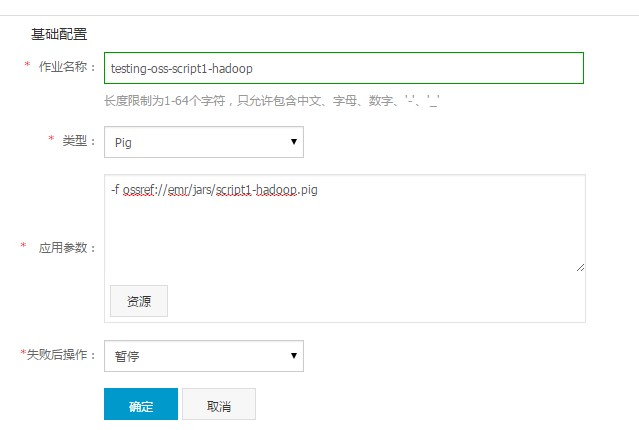
创建执行计划并运行。在 E-MapReduce 执行计划中创建执行计划,将上一步创建好的 Pig 作业添加到执行计划中,策略请选择“立即执行”,这样 script1-hadoop 作业就会在选定集群中运行起来了。
最后更新:2016-11-23 16:03:59
上一篇: Hive 开发手册__Hadoop_开发人员指南_E-MapReduce-阿里云
下一篇: Hadoop Streaming__Hadoop_开发人员指南_E-MapReduce-阿里云
- 删除所有特殊流控__流量控制相关接口_API_API 网关-阿里云
- 建站市场条件__服务商入驻_服务商_云市场-阿里云
- VPC网络环境连接OSS地址失败的解决方法__异常处理_用户指南_专有网络 VPC-阿里云
- 步骤 2:创建Linux实例__快速入门(Linux)_云服务器 ECS-阿里云
- CreatePolicyVersion__授权策略管理接口_RAM API文档_访问控制-阿里云
- 备份恢复服务__系统架构_产品简介_云数据库 RDS 版-阿里云
- 创建订单__订单服务接口_API文档_域名-阿里云
- C++ SDK__SDK使用手册_消息服务-阿里云
- SDK快速入门__数据订阅_用户指南_数据传输-阿里云
- RDS__操作事件(Event)样例_用户指南_操作审计-阿里云
相关内容
- 常见错误说明__附录_大数据计算服务-阿里云
- 发送短信接口__API使用手册_短信服务-阿里云
- 接口文档__Android_安全组件教程_移动安全-阿里云
- 运营商错误码(联通)__常见问题_短信服务-阿里云
- 设置短信模板__使用手册_短信服务-阿里云
- OSS 权限问题及排查__常见错误及排除_最佳实践_对象存储 OSS-阿里云
- 消息通知__操作指南_批量计算-阿里云
- 设备端快速接入(MQTT)__快速开始_阿里云物联网套件-阿里云
- 查询API调用流量数据__API管理相关接口_API_API 网关-阿里云
- 使用STS访问__JavaScript-SDK_SDK 参考_对象存储 OSS-阿里云