 391
391
網絡分析__使用手冊(new)_機器學習-阿裏雲
目錄
網絡分析欄提供的都是基於Graph數據結構的分析算法;下圖是使用平台網絡分析組件構建的一個分析流程實例:
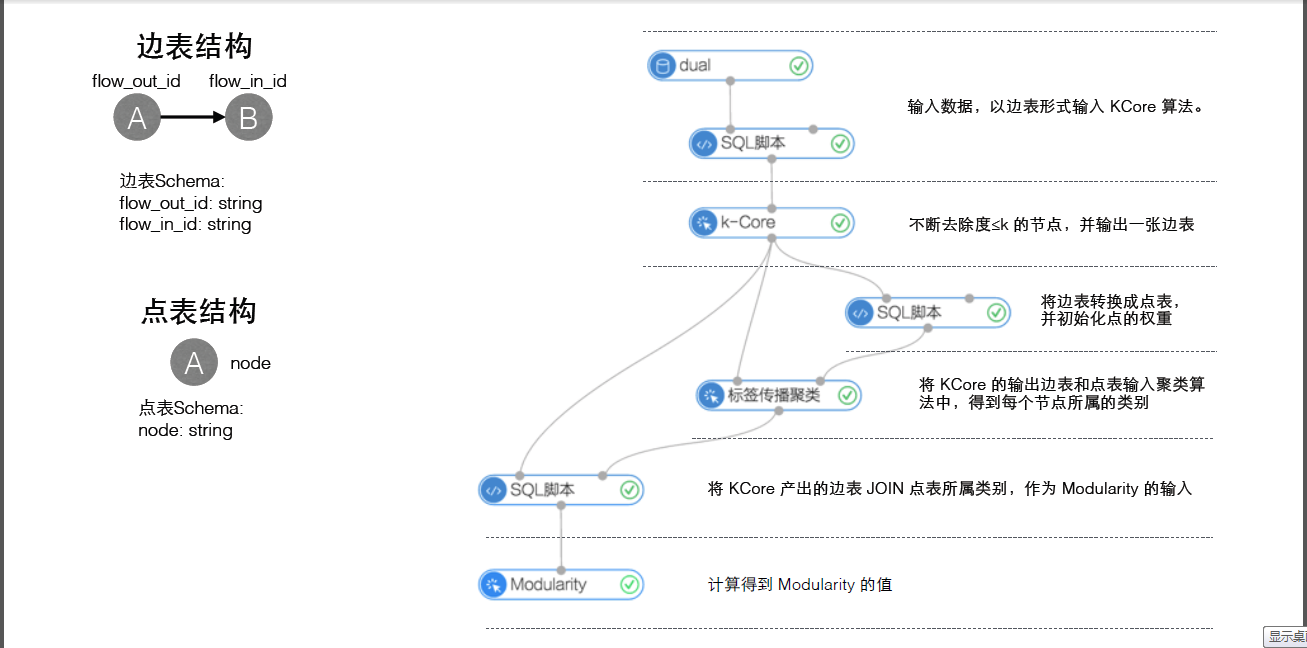
網絡分析欄的算法組件都需要設置運行參數,參數說明如下:進程數:參數代號workerNum,用於設置作業並行執行的節點數;數字越大並行度越高,但框架通訊開銷會增大。進程內存:參數代號workerMem,用於設置單個 worker可使用的最大內存量,默認每個worker分配4096內存;實際使用內存超過該值,會拋出OutOfMemory異常。
k-Core
功能介紹
- 一個圖的KCore是指反複去除度小於或等於k的節點後,所剩餘的子圖。若一個節點存在於KCore,而在(K+1)CORE中被移去,那麼此節點的核數(coreness)為k。因此所有度為1的節點的核數必然為0,節點核數的最大值被稱為圖的核數。
參數設置
k:核數的值,必填,默認3
實例
測試數據
新建數據SQL
drop table if exists KCore_func_test_edge;create table KCore_func_test_edge asselect * from(select '1' as flow_out_id,'2' as flow_in_id from dualunion allselect '1' as flow_out_id,'3' as flow_in_id from dualunion allselect '1' as flow_out_id,'4' as flow_in_id from dualunion allselect '2' as flow_out_id,'3' as flow_in_id from dualunion allselect '2' as flow_out_id,'4' as flow_in_id from dualunion allselect '3' as flow_out_id,'4' as flow_in_id from dualunion allselect '3' as flow_out_id,'5' as flow_in_id from dualunion allselect '3' as flow_out_id,'6' as flow_in_id from dualunion allselect '5' as flow_out_id,'6' as flow_in_id from dual)tmp;
數據對應的graph結構如下圖:

運行結果
設定k = 2:運行結果:結果如下:
+-------+-------+| node1 | node2 |+-------+-------+| 1 | 2 || 1 | 3 || 1 | 4 || 2 | 1 || 2 | 3 || 2 | 4 || 3 | 1 || 3 | 2 || 3 | 4 || 4 | 1 || 4 | 2 || 4 | 3 |+-------+-------+
pai命令示例
pai -name KCore-project algo_public-DinputEdgeTableName=KCore_func_test_edge-DfromVertexCol=flow_out_id-DtoVertexCol=flow_in_id-DoutputTableName=KCore_func_test_result-Dk=2;
算法參數
| 參數key名稱 | 參數描述 | 必/選填 | 默認值 |
|---|---|---|---|
| inputEdgeTableName | 輸入邊表名 | 必填 | - |
| inputEdgeTablePartitions | 輸入邊表的分區 | 選填 | 全表讀入 |
| fromVertexCol | 邊表中起點所在列 | 必填 | - |
| toVertexCol | 邊表中終點所在列 | 必填 | - |
| outputTableName | 輸出表名 | 必填 | - |
| outputTablePartitions | 輸出表的分區 | 選填 | - |
| lifecycle | 輸出表申明周期 | 選填 | - |
| workerNum | 進程數量 | 選填 | 未設置 |
| workerMem | 進程內存 | 選填 | 4096 |
| splitSize | 數據切分大小 | 選填 | 64 |
| k | 核數 | 必填 | 3 |
單源最短路徑
功能介紹
- 單源最短路徑參考Dijkstra算法,本算法中當給定起點,則輸出該點和其他所有節點的最短路徑。
參數設置
起始節點id:用於計算最短路徑的起始節點,必填
實例
測試數據
新建數據的SQL語句:
drop table if exists SSSP_func_test_edge;create table SSSP_func_test_edge asselectflow_out_id,flow_in_id,edge_weightfrom(select "a" as flow_out_id,"b" as flow_in_id,1.0 as edge_weight from dualunion allselect "b" as flow_out_id,"c" as flow_in_id,2.0 as edge_weight from dualunion allselect "c" as flow_out_id,"d" as flow_in_id,1.0 as edge_weight from dualunion allselect "b" as flow_out_id,"e" as flow_in_id,2.0 as edge_weight from dualunion allselect "e" as flow_out_id,"d" as flow_in_id,1.0 as edge_weight from dualunion allselect "c" as flow_out_id,"e" as flow_in_id,1.0 as edge_weight from dualunion allselect "f" as flow_out_id,"g" as flow_in_id,3.0 as edge_weight from dualunion allselect "a" as flow_out_id,"d" as flow_in_id,4.0 as edge_weight from dual) tmp;
數據對應的graph結構: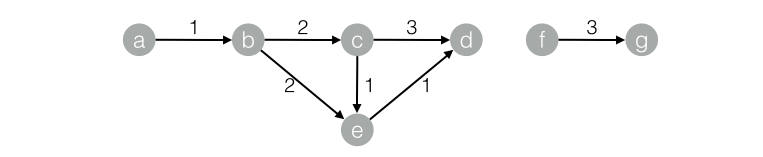
運行結果
結果如下:+------------+------------+------------+--------------+| start_node | dest_node | distance | distance_cnt |+------------+------------+------------+--------------+| a | b | 1.0 | 1 || a | c | 3.0 | 1 || a | d | 4.0 | 3 || a | a | 0.0 | 0 || a | e | 3.0 | 1 |+------------+------------+------------+--------------+
pai命令示例
pai -name SSSP-project algo_public-DinputEdgeTableName=SSSP_func_test_edge-DfromVertexCol=flow_out_id-DtoVertexCol=flow_in_id-DoutputTableName=SSSP_func_test_result-DhasEdgeWeight=true-DedgeWeightCol=edge_weight-DstartVertex=a;
算法參數
| 參數key名稱 | 參數描述 | 必/選填 | 默認值 |
|---|---|---|---|
| inputEdgeTableName | 輸入邊表名 | 必填 | - |
| inputEdgeTablePartitions | 輸入邊表的分區 | 選填 | 全表讀入 |
| fromVertexCol | 輸入邊表的起點所在列 | 必填 | - |
| toVertexCol | 輸入邊表的終點所在列 | 必填 | - |
| outputTableName | 輸出表名 | 必填 | - |
| outputTablePartitions | 輸出表的分區 | 選填 | - |
| lifecycle | 輸出表申明周期 | 選填 | - |
| workerNum | 進程數量 | 選填 | 未設置 |
| workerMem | 進程內存 | 選填 | 4096 |
| splitSize | 數據切分大小 | 選填 | 64 |
| startVertex | 起始節點ID | 必填 | - |
| hasEdgeWeight | 輸入邊表的邊是否有權重 | 選填 | false |
| edgeWeightCol | 輸入邊表邊的權重所在列 | 選填 | - |
PageRank
功能介紹
- PageRank起於網頁的搜索排序,google利用網頁的鏈接結構計算每個網頁的等級排名,其基本思路是:如果一個網頁被其他多個網頁指向,這說明該網頁比較重要或者質量較高。除考慮網頁的鏈接數量,還考慮網頁本身的權重級別,以及該網頁有多少條出鏈到其它網頁。 對於用戶構成的人際網絡,除了用戶本身的影響力之外,邊的權重也是重要因素之一。例如:新浪微博的某個用戶,會更容易影響粉絲中關係比較親密的家人、同學、同事等,而對陌生的弱關係粉絲影響較小。在人際網絡中,邊的權重等價為用戶-用戶的關係強弱指數。帶連接權重的PageRank公式為:
 其中,w(i)為節點i的權重,c(A,i)為鏈接權重,d為阻尼係數,算法迭代穩定後的節點權重W即為每個用戶的影響力指數。
參數設置
最大迭代次數:算法自身會收斂並停止迭代,選填,默認30
實例
測試數據
新建數據的SQL語句:
drop table if exists PageRankWithWeight_func_test_edge;create table PageRankWithWeight_func_test_edge asselect * from(select 'a' as flow_out_id,'b' as flow_in_id,1.0 as weight from dualunion allselect 'a' as flow_out_id,'c' as flow_in_id,1.0 as weight from dualunion allselect 'b' as flow_out_id,'c' as flow_in_id,1.0 as weight from dualunion allselect 'b' as flow_out_id,'d' as flow_in_id,1.0 as weight from dualunion allselect 'c' as flow_out_id,'d' as flow_in_id,1.0 as weight from dual)tmp;
對應的graph結構:
運行結果
結果如下:+------+------------+| node | weight |+------+------------+| a | 0.0375 || b | 0.06938 || c | 0.12834 || d | 0.20556 |+------+------------+
pai命令示例
pai -name PageRankWithWeight-project algo_public-DinputEdgeTableName=PageRankWithWeight_func_test_edge-DfromVertexCol=flow_out_id-DtoVertexCol=flow_in_id-DoutputTableName=PageRankWithWeight_func_test_result-DhasEdgeWeight=true-DedgeWeightCol=weight-DmaxIter 100;
算法參數
| 參數key名稱 | 參數描述 | 必/選填 | 默認值 |
|---|---|---|---|
| inputEdgeTableName | 輸入邊表名 | 必填 | - |
| inputEdgeTablePartitions | 輸入邊表的分區 | 選填 | 全表讀入 |
| fromVertexCol | 輸入邊表的起點所在列 | 必填 | - |
| toVertexCol | 輸入邊表的終點所在列 | 必填 | - |
| outputTableName | 輸出表名 | 必填 | - |
| outputTablePartitions | 輸出表的分區 | 選填 | - |
| lifecycle | 輸出表申明周期 | 選填 | - |
| workerNum | 進程數量 | 選填 | 未設置 |
| workerMem | 進程內存 | 選填 | 4096 |
| splitSize | 數據切分大小 | 選填 | 64 |
| hasEdgeWeight | 輸入邊表的邊是否有權重 | 選填 | false |
| edgeWeightCol | 輸入邊表邊的權重所在列 | 選填 | - |
| maxIter | 最大迭代次數 | 選填 | 30 |
標簽傳播聚類
功能介紹
圖聚類是根據圖的拓撲結構,進行子圖的劃分,使得子圖內部節點的鏈接較多,子圖之間的連接較少。標簽傳播算法(Label Propagation Algorithm, LPA)是基於圖的半監督學習方法,其基本思路是節點的標簽(community)依賴其鄰居節點的標簽信息,影響程度由節點相似度決定,並通過傳播迭代更新達到穩定。
參數介紹
最大迭代次數:選填,默認30
實例
測試數據
數據生成SQL:
drop table if exists LabelPropagationClustering_func_test_edge;create table LabelPropagationClustering_func_test_edge asselect * from(select '1' as flow_out_id,'2' as flow_in_id,0.7 as edge_weight from dualunion allselect '1' as flow_out_id,'3' as flow_in_id,0.7 as edge_weight from dualunion allselect '1' as flow_out_id,'4' as flow_in_id,0.6 as edge_weight from dualunion allselect '2' as flow_out_id,'3' as flow_in_id,0.7 as edge_weight from dualunion allselect '2' as flow_out_id,'4' as flow_in_id,0.6 as edge_weight from dualunion allselect '3' as flow_out_id,'4' as flow_in_id,0.6 as edge_weight from dualunion allselect '4' as flow_out_id,'6' as flow_in_id,0.3 as edge_weight from dualunion allselect '5' as flow_out_id,'6' as flow_in_id,0.6 as edge_weight from dualunion allselect '5' as flow_out_id,'7' as flow_in_id,0.7 as edge_weight from dualunion allselect '5' as flow_out_id,'8' as flow_in_id,0.7 as edge_weight from dualunion allselect '6' as flow_out_id,'7' as flow_in_id,0.6 as edge_weight from dualunion allselect '6' as flow_out_id,'8' as flow_in_id,0.6 as edge_weight from dualunion allselect '7' as flow_out_id,'8' as flow_in_id,0.7 as edge_weight from dual)tmp;drop table if exists LabelPropagationClustering_func_test_node;create table LabelPropagationClustering_func_test_node asselect * from(select '1' as node,0.7 as node_weight from dualunion allselect '2' as node,0.7 as node_weight from dualunion allselect '3' as node,0.7 as node_weight from dualunion allselect '4' as node,0.5 as node_weight from dualunion allselect '5' as node,0.7 as node_weight from dualunion allselect '6' as node,0.5 as node_weight from dualunion allselect '7' as node,0.7 as node_weight from dualunion allselect '8' as node,0.7 as node_weight from dual)tmp;
數據對應的group結構: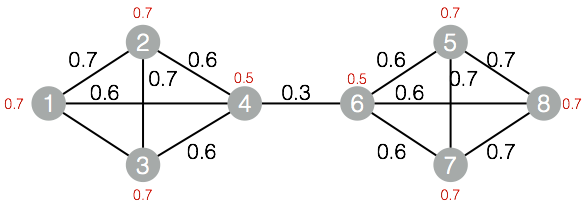
運行結果
結果如下:
+------+------------+| node | group_id |+------+------------+| 1 | 1 || 2 | 1 || 3 | 1 || 4 | 1 || 5 | 5 || 6 | 5 || 7 | 5 || 8 | 5 |+------+------------+
pai命令示例
pai -name LabelPropagationClustering-project algo_public-DinputEdgeTableName=LabelPropagationClustering_func_test_edge-DfromVertexCol=flow_out_id-DtoVertexCol=flow_in_id-DinputVertexTableName=LabelPropagationClustering_func_test_node-DvertexCol=node-DoutputTableName=LabelPropagationClustering_func_test_result-DhasEdgeWeight=true-DedgeWeightCol=edge_weight-DhasVertexWeight=true-DvertexWeightCol=node_weight-DrandSelect=true-DmaxIter=100;
算法參數
| 參數key名稱 | 參數描述 | 必/選填 | 默認值 |
|---|---|---|---|
| inputEdgeTableName | 輸入邊表名 | 必填 | - |
| inputEdgeTablePartitions | 輸入邊表的分區 | 選填 | 全表讀入 |
| fromVertexCol | 輸入邊表的起點所在列 | 必填 | - |
| toVertexCol | 輸入邊表的終點所在列 | 必填 | - |
| inputVertexTableName | 輸入點表名稱 | 必填 | - |
| inputVertexTablePartitions | 輸入點表的分區 | 選填 | 全表讀入 |
| vertexCol | 輸入點表的點所在列 | 必填 | - |
| outputTableName | 輸出表名 | 必填 | - |
| outputTablePartitions | 輸出表的分區 | 選填 | - |
| lifecycle | 輸出表申明周期 | 選填 | - |
| workerNum | 進程數量 | 選填 | 未設置 |
| workerMem | 進程內存 | 選填 | 4096 |
| splitSize | 數據切分大小 | 選填 | 64 |
| hasEdgeWeight | 輸入邊表的邊是否有權重 | 選填 | false |
| edgeWeightCol | 輸入邊表邊的權重所在列 | 選填 | - |
| hasVertexWeight | 輸入點表的點是否有權重 | 選填 | false |
| vertexWeightCol | 輸入點表的點的權重所在列 | 選填 | - |
| randSelect | 是否隨機選擇最大標簽 | 選填 | false |
| maxIter | 最大迭代次數 | 選填 | 30 |
標簽傳播分類
功能介紹
該算法為半監督的分類算法,原理為用已標記節點的標簽信息去預測未標記節點的標簽信息。
在算法執行過程中,每個節點的標簽按相似度傳播給相鄰節點,在節點傳播的每一步,每個節點根據相鄰節點的標簽來更新自己的標簽,與該節點相似度越大,其相鄰節點對其標注的影響權值越大,相似節點的標簽越趨於一致,其標簽就越容易傳播。在標簽傳播過程中,保持已標注數據的標簽不變,使其像一個源頭把標簽傳向未標注數據。
最終,當迭代過程結束時,相似節點的概率分布也趨於相似,可以劃分到同一個類別中,從而完成標簽傳播過程
參數設置
阻尼係數:默認0.8收斂係數:默認0.000001
實例
測試數據
生成數據的SQL:
drop table if exists LabelPropagationClassification_func_test_edge;create table LabelPropagationClassification_func_test_edge asselect * from(select 'a' as flow_out_id, 'b' as flow_in_id, 0.2 as edge_weight from dualunion allselect 'a' as flow_out_id, 'c' as flow_in_id, 0.8 as edge_weight from dualunion allselect 'b' as flow_out_id, 'c' as flow_in_id, 1.0 as edge_weight from dualunion allselect 'd' as flow_out_id, 'b' as flow_in_id, 1.0 as edge_weight from dual)tmp;drop table if exists LabelPropagationClassification_func_test_node;create table LabelPropagationClassification_func_test_node asselect * from(select 'a' as node,'X' as label, 1.0 as label_weight from dualunion allselect 'd' as node,'Y' as label, 1.0 as label_weight from dual)tmp;
對應的圖結構: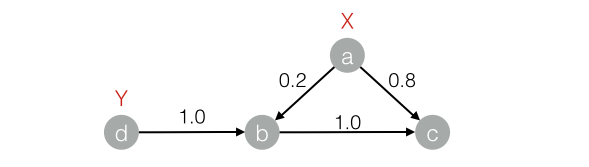
運行結果
結果如下:+------+-----+------------+| node | tag | weight |+------+-----+------------+| a | X | 1.0 || b | X | 0.16667 || b | Y | 0.83333 || c | X | 0.53704 || c | Y | 0.46296 || d | Y | 1.0 |+------+-----+------------+
pai命令示例
pai -name LabelPropagationClassification-project algo_public-DinputEdgeTableName=LabelPropagationClassification_func_test_edge-DfromVertexCol=flow_out_id-DtoVertexCol=flow_in_id-DinputVertexTableName=LabelPropagationClassification_func_test_node-DvertexCol=node-DvertexLabelCol=label-DoutputTableName=LabelPropagationClassification_func_test_result-DhasEdgeWeight=true-DedgeWeightCol=edge_weight-DhasVertexWeight=true-DvertexWeightCol=label_weight-Dalpha=0.8-Depsilon=0.000001;
算法參數
| 參數key名稱 | 參數描述 | 必/選填 | 默認值 |
|---|---|---|---|
| inputEdgeTableName | 輸入邊表名 | 必填 | - |
| inputEdgeTablePartitions | 輸入邊表的分區 | 選填 | 全表讀入 |
| fromVertexCol | 輸入邊表的起點所在列 | 必填 | - |
| toVertexCol | 輸入邊表的終點所在列 | 必填 | - |
| inputVertexTableName | 輸入點表名稱 | 必填 | - |
| inputVertexTablePartitions | 輸入點表的分區 | 選填 | 全表讀入 |
| vertexCol | 輸入點表的點所在列 | 必填 | - |
| vertexLabelCol | 輸入點表的點的標簽 | 必填 | - |
| outputTableName | 輸出表名 | 必填 | - |
| outputTablePartitions | 輸出表的分區 | 選填 | - |
| lifecycle | 輸出表申明周期 | 選填 | - |
| workerNum | 進程數量 | 選填 | 未設置 |
| workerMem | 進程內存 | 選填 | 4096 |
| splitSize | 數據切分大小 | 選填 | 64 |
| hasEdgeWeight | 輸入邊表的邊是否有權重 | 選填 | false |
| edgeWeightCol | 輸入邊表邊的權重所在列 | 選填 | - |
| hasVertexWeight | 輸入點表的點是否有權重 | 選填 | false |
| vertexWeightCol | 輸入點表的點的權重所在列 | 選填 | - |
| alpha | 阻尼係數 | 選填 | 0.8 |
| epsilon | 收斂係數 | 選填 | 0.000001 |
| maxIter | 最大迭代次數 | 選填 | 30 |
Modularity
功能介紹
- Modularity是一種評估社區網絡結構的指標,來評估網絡結構中劃分出來社區的緊密程度,往往0.3以上是比較明顯的社區結構。
實例
測試數據
略(與標簽傳播聚類算法的數據相同)
運行結果
結果如下:+--------------+| val |+--------------+| 0.4230769 |+--------------+
pai命令示例
pai -name Modularity-project algo_public-DinputEdgeTableName=Modularity_func_test_edge-DfromVertexCol=flow_out_id-DfromGroupCol=group_out_id-DtoVertexCol=flow_in_id-DtoGroupCol=group_in_id-DoutputTableName=Modularity_func_test_result;
算法參數
| 參數key名稱 | 參數描述 | 必/選填 | 默認值 |
|---|---|---|---|
| inputEdgeTableName | 輸入邊表名 | 必填 | - |
| inputEdgeTablePartitions | 輸入邊表的分區 | 選填 | 全表讀入 |
| fromVertexCol | 輸入邊表的起點所在列 | 必填 | - |
| fromGroupCol | 輸入邊表起點的群組 | 必填 | - |
| toVertexCol | 輸入邊表的終點所在列 | 必填 | - |
| toGroupCol | 輸入邊表終點的群組 | 必填 | - |
| outputTableName | 輸出表名 | 必填 | - |
| outputTablePartitions | 輸出表的分區 | 選填 | - |
| lifecycle | 輸出表申明周期 | 選填 | - |
| workerNum | 進程數量 | 選填 | 未設置 |
| workerMem | 進程內存 | 選填 | 4096 |
| splitSize | 數據切分大小 | 選填 | 64 |
最大聯通子圖
功能介紹
在無向圖G中,若從頂點A到頂點B有路徑相連,則稱A和B是連通的;在圖G種存在若幹子圖,其中每個子圖中所有頂點之間都是連通的,但在不同子圖間不存在頂點連通,那麼稱圖G的這些子圖為最大連通子圖。
參數設置
無
實例
測試數據
生成數據的SQL:
drop table if exists MaximalConnectedComponent_func_test_edge;create table MaximalConnectedComponent_func_test_edge asselect * from(select '1' as flow_out_id,'2' as flow_in_id from dualunion allselect '2' as flow_out_id,'3' as flow_in_id from dualunion allselect '3' as flow_out_id,'4' as flow_in_id from dualunion allselect '1' as flow_out_id,'4' as flow_in_id from dualunion allselect 'a' as flow_out_id,'b' as flow_in_id from dualunion allselect 'b' as flow_out_id,'c' as flow_in_id from dual)tmp;drop table if exists MaximalConnectedComponent_func_test_result;create table MaximalConnectedComponent_func_test_result(node string,grp_id string);
對應的圖結構:
運行結果
結果如下:+-------+-------+| node | grp_id|+-------+-------+| 1 | 4 || 2 | 4 || 3 | 4 || 4 | 4 || a | c || b | c || c | c |+-------+-------+
pai命令示例
pai -name MaximalConnectedComponent-project algo_public-DinputEdgeTableName=MaximalConnectedComponent_func_test_edge-DfromVertexCol=flow_out_id-DtoVertexCol=flow_in_id-DoutputTableName=MaximalConnectedComponent_func_test_result;
算法參數
| 參數key名稱 | 參數描述 | 必/選填 | 默認值 |
|---|---|---|---|
| inputEdgeTableName | 輸入邊表名 | 必填 | - |
| inputEdgeTablePartitions | 輸入邊表的分區 | 選填 | 全表讀入 |
| fromVertexCol | 輸入邊表的起點所在列 | 必填 | - |
| toVertexCol | 輸入邊表的終點所在列 | 必填 | - |
| outputTableName | 輸出表名 | 必填 | - |
| outputTablePartitions | 輸出表的分區 | 選填 | - |
| lifecycle | 輸出表申明周期 | 選填 | - |
| workerNum | 進程數量 | 選填 | 未設置 |
| workerMem | 進程內存 | 選填 | 4096 |
| splitSize | 數據切分大小 | 選填 | 64 |
點聚類係數
功能介紹
在無向圖G中,計算每一個節點周圍的稠密度,星狀網絡稠密度為0,全聯通網絡稠密度為1。
參數設置
maxEdgeCnt:若節點度大於該值,則進行抽樣,默認500,選填。
實例
測試數據
生成數據的SQL:
drop table if exists NodeDensity_func_test_edge;create table NodeDensity_func_test_edge asselect * from(select '1' as flow_out_id, '2' as flow_in_id from dualunion allselect '1' as flow_out_id, '3' as flow_in_id from dualunion allselect '1' as flow_out_id, '4' as flow_in_id from dualunion allselect '1' as flow_out_id, '5' as flow_in_id from dualunion allselect '1' as flow_out_id, '6' as flow_in_id from dualunion allselect '2' as flow_out_id, '3' as flow_in_id from dualunion allselect '3' as flow_out_id, '4' as flow_in_id from dualunion allselect '4' as flow_out_id, '5' as flow_in_id from dualunion allselect '5' as flow_out_id, '6' as flow_in_id from dualunion allselect '5' as flow_out_id, '7' as flow_in_id from dualunion allselect '6' as flow_out_id, '7' as flow_in_id from dual)tmp;drop table if exists NodeDensity_func_test_result;create table NodeDensity_func_test_result(node string,node_cnt bigint,edge_cnt bigint,density double,log_density double);
對應的圖結構:
運行結果
結果如下:1,5,4,0.4,1.456572,2,1,1.0,1.246963,3,2,0.66667,1.352044,3,2,0.66667,1.352045,4,3,0.5,1.411896,3,2,0.66667,1.352047,2,1,1.0,1.24696
pai命令示例
pai -name NodeDensity-project algo_public-DinputEdgeTableName=NodeDensity_func_test_edge-DfromVertexCol=flow_out_id-DtoVertexCol=flow_in_id-DoutputTableName=NodeDensity_func_test_result-DmaxEdgeCnt=500;
算法參數
| 參數key名稱 | 參數描述 | 必/選填 | 默認值 |
|---|---|---|---|
| inputEdgeTableName | 輸入邊表名 | 必填 | - |
| inputEdgeTablePartitions | 輸入邊表的分區 | 選填 | 全表讀入 |
| fromVertexCol | 輸入邊表的起點所在列 | 必填 | - |
| toVertexCol | 輸入邊表的終點所在列 | 必填 | - |
| outputTableName | 輸出表名 | 必填 | - |
| outputTablePartitions | 輸出表的分區 | 選填 | - |
| lifecycle | 輸出表申明周期 | 選填 | - |
| maxEdgeCnt | 若節點度大於該值,則進行抽樣。 | 選填 | 500 |
| workerNum | 進程數量 | 選填 | 未設置 |
| workerMem | 進程內存 | 選填 | 4096 |
| splitSize | 數據切分大小 | 選填 | 64 |
邊聚類係數
功能介紹
在無向圖G中,計算每一條邊周圍的稠密度。
參數設置
無
實例
測試數據
生成數據的SQL:
drop table if exists EdgeDensity_func_test_edge;create table EdgeDensity_func_test_edge asselect * from(select '1' as flow_out_id,'2' as flow_in_id from dualunion allselect '1' as flow_out_id,'3' as flow_in_id from dualunion allselect '1' as flow_out_id,'5' as flow_in_id from dualunion allselect '1' as flow_out_id,'7' as flow_in_id from dualunion allselect '2' as flow_out_id,'5' as flow_in_id from dualunion allselect '2' as flow_out_id,'4' as flow_in_id from dualunion allselect '2' as flow_out_id,'3' as flow_in_id from dualunion allselect '3' as flow_out_id,'5' as flow_in_id from dualunion allselect '3' as flow_out_id,'4' as flow_in_id from dualunion allselect '4' as flow_out_id,'5' as flow_in_id from dualunion allselect '4' as flow_out_id,'8' as flow_in_id from dualunion allselect '5' as flow_out_id,'6' as flow_in_id from dualunion allselect '5' as flow_out_id,'7' as flow_in_id from dualunion allselect '5' as flow_out_id,'8' as flow_in_id from dualunion allselect '7' as flow_out_id,'6' as flow_in_id from dualunion allselect '6' as flow_out_id,'8' as flow_in_id from dual)tmp;drop table if exists EdgeDensity_func_test_result;create table EdgeDensity_func_test_result(node1 string,node2 string,node1_edge_cnt bigint,node2_edge_cnt bigint,triangle_cnt bigint,density double);
對應的圖結構:
運行結果
結果如下:1,2,4,4,2,0.52,3,4,4,3,0.752,5,4,7,3,0.753,1,4,4,2,0.53,4,4,4,2,0.54,2,4,4,2,0.54,5,4,7,3,0.755,1,7,4,3,0.755,3,7,4,3,0.755,6,7,3,2,0.666675,8,7,3,2,0.666676,7,3,3,1,0.333337,1,3,4,1,0.333337,5,3,7,2,0.666678,4,3,4,1,0.333338,6,3,3,1,0.33333
pai命令示例
pai -name EdgeDensity-project algo_public-DinputEdgeTableName=EdgeDensity_func_test_edge-DfromVertexCol=flow_out_id-DtoVertexCol=flow_in_id-DoutputTableName=EdgeDensity_func_test_result;
算法參數
| 參數key名稱 | 參數描述 | 必/選填 | 默認值 |
|---|---|---|---|
| inputEdgeTableName | 輸入邊表名 | 必填 | - |
| inputEdgeTablePartitions | 輸入邊表的分區 | 選填 | 全表讀入 |
| fromVertexCol | 輸入邊表的起點所在列 | 必填 | - |
| toVertexCol | 輸入邊表的終點所在列 | 必填 | - |
| outputTableName | 輸出表名 | 必填 | - |
| outputTablePartitions | 輸出表的分區 | 選填 | - |
| lifecycle | 輸出表申明周期 | 選填 | - |
| workerNum | 進程數量 | 選填 | 未設置 |
| workerMem | 進程內存 | 選填 | 4096 |
| splitSize | 數據切分大小 | 選填 | 64 |
計數三角形
功能介紹
在無向圖G中,輸出所有三角形。
參數設置
maxEdgeCnt:若節點度大於該值,則進行抽樣,默認500,選填。
實例
測試數據
生成數據的SQL:
drop table if exists TriangleCount_func_test_edge;create table TriangleCount_func_test_edge asselect * from(select '1' as flow_out_id,'2' as flow_in_id from dualunion allselect '1' as flow_out_id,'3' as flow_in_id from dualunion allselect '1' as flow_out_id,'4' as flow_in_id from dualunion allselect '1' as flow_out_id,'5' as flow_in_id from dualunion allselect '1' as flow_out_id,'6' as flow_in_id from dualunion allselect '2' as flow_out_id,'3' as flow_in_id from dualunion allselect '3' as flow_out_id,'4' as flow_in_id from dualunion allselect '4' as flow_out_id,'5' as flow_in_id from dualunion allselect '5' as flow_out_id,'6' as flow_in_id from dualunion allselect '5' as flow_out_id,'7' as flow_in_id from dualunion allselect '6' as flow_out_id,'7' as flow_in_id from dual)tmp;drop table if exists TriangleCount_func_test_result;create table TriangleCount_func_test_result(node1 string,node2 string,node3 string);
對應的圖結構:
運行結果
結果如下:1,2,31,3,41,4,51,5,65,6,7
pai命令示例
pai -name TriangleCount-project algo_public-DinputEdgeTableName=TriangleCount_func_test_edge-DfromVertexCol=flow_out_id-DtoVertexCol=flow_in_id-DoutputTableName=TriangleCount_func_test_result;
算法參數
| 參數key名稱 | 參數描述 | 必/選填 | 默認值 |
|---|---|---|---|
| inputEdgeTableName | 輸入邊表名 | 必填 | - |
| inputEdgeTablePartitions | 輸入邊表的分區 | 選填 | 全表讀入 |
| fromVertexCol | 輸入邊表的起點所在列 | 必填 | - |
| toVertexCol | 輸入邊表的終點所在列 | 必填 | - |
| outputTableName | 輸出表名 | 必填 | - |
| outputTablePartitions | 輸出表的分區 | 選填 | - |
| lifecycle | 輸出表申明周期 | 選填 | - |
| maxEdgeCnt | 若節點度大於該值,則進行抽樣。 | 選填 | 500 |
| workerNum | 進程數量 | 選填 | 未設置 |
| workerMem | 進程內存 | 選填 | 4096 |
| splitSize | 數據切分大小 | 選填 | 64 |
樹深度
功能介紹
對於眾多樹狀網絡,輸出每個節點的所處深度和樹ID。
參數設置
無
實例
測試數據
生成數據的SQL:
drop table if exists TreeDepth_func_test_edge;create table TreeDepth_func_test_edge asselect * from(select '0' as flow_out_id, '1' as flow_in_id from dualunion allselect '0' as flow_out_id, '2' as flow_in_id from dualunion allselect '1' as flow_out_id, '3' as flow_in_id from dualunion allselect '1' as flow_out_id, '4' as flow_in_id from dualunion allselect '2' as flow_out_id, '4' as flow_in_id from dualunion allselect '2' as flow_out_id, '5' as flow_in_id from dualunion allselect '4' as flow_out_id, '6' as flow_in_id from dualunion allselect 'a' as flow_out_id, 'b' as flow_in_id from dualunion allselect 'a' as flow_out_id, 'c' as flow_in_id from dualunion allselect 'c' as flow_out_id, 'd' as flow_in_id from dualunion allselect 'c' as flow_out_id, 'e' as flow_in_id from dual)tmp;drop table if exists TreeDepth_func_test_result;create table TreeDepth_func_test_result(node string,root string,depth bigint);
對應的圖結構:
運行結果
結果如下:0,0,01,0,12,0,13,0,24,0,25,0,26,0,3a,a,0b,a,1c,a,1d,a,2e,a,2
pai命令示例
pai -name TreeDepth-project algo_public-DinputEdgeTableName=TreeDepth_func_test_edge-DfromVertexCol=flow_out_id-DtoVertexCol=flow_in_id-DoutputTableName=TreeDepth_func_test_result;
算法參數
| 參數key名稱 | 參數描述 | 必/選填 | 默認值 |
|---|---|---|---|
| inputEdgeTableName | 輸入邊表名 | 必填 | - |
| inputEdgeTablePartitions | 輸入邊表的分區 | 選填 | 全表讀入 |
| fromVertexCol | 輸入邊表的起點所在列 | 必填 | - |
| toVertexCol | 輸入邊表的終點所在列 | 必填 | - |
| outputTableName | 輸出表名 | 必填 | - |
| outputTablePartitions | 輸出表的分區 | 選填 | - |
| lifecycle | 輸出表申明周期 | 選填 | - |
| workerNum | 進程數量 | 選填 | 未設置 |
| workerMem | 進程內存 | 選填 | 4096 |
| splitSize | 數據切分大小 | 選填 | 64 |
最後更新:2016-11-23 16:04:15
上一篇: 文本分析__使用手冊(new)_機器學習-阿裏雲
下一篇: 【圖算法】金融風控實驗__案例_機器學習-阿裏雲
- 查詢簽名密鑰列表__後端簽名密鑰相關接口_API_API 網關-阿裏雲
- Python SDK下載__SDK下載_SDK使用手冊_歸檔存儲-阿裏雲
- ListVirtualMFADevices__用戶管理接口_RAM API文檔_訪問控製-阿裏雲
- Job配置約定__作業配置說明_使用手冊_數據集成-阿裏雲
- 修改集群名稱__集群_API參考_E-MapReduce-阿裏雲
- 短信字數最多能發多少個字? 建議400個字以內的短信。__常見問題_短信服務-阿裏雲
- 自定義算法開發__產品簡介_推薦引擎-阿裏雲
- 企業信息安全整體解決方案 阿裏雲棲大會,我們來了!
- 關鍵組件和流程__產品簡介_業務實時監控服務 ARMS-阿裏雲
- 添加監控服務器__測試環境_使用手冊_性能測試-阿裏雲
相關內容
- 常見錯誤說明__附錄_大數據計算服務-阿裏雲
- 發送短信接口__API使用手冊_短信服務-阿裏雲
- 接口文檔__Android_安全組件教程_移動安全-阿裏雲
- 運營商錯誤碼(聯通)__常見問題_短信服務-阿裏雲
- 設置短信模板__使用手冊_短信服務-阿裏雲
- OSS 權限問題及排查__常見錯誤及排除_最佳實踐_對象存儲 OSS-阿裏雲
- 消息通知__操作指南_批量計算-阿裏雲
- 設備端快速接入(MQTT)__快速開始_阿裏雲物聯網套件-阿裏雲
- 查詢API調用流量數據__API管理相關接口_API_API 網關-阿裏雲
- 使用STS訪問__JavaScript-SDK_SDK 參考_對象存儲 OSS-阿裏雲